Friday, December 9, 2011

You-Tube

I am very familiar with YouTube.  I have my own YouTube page: though not for uploading videos.  I have one so I can subscribe to other YouTubers.  My favorite YouTubers are John and Hank Green aka The Vlogbrothers.

I think the library can definitely benefit from using YouTube.  Every year the Youth Department makes a video advertising the Summer Reading Club.  This is the perfect kind of thing for the library to upload to YouTube.  We can also make book trailers to highlight books discussed in book discussions or our One Great Read books.  I've also heard of library's posting "talk show" type videos with their teens where they talk about their favorite books, authors, etc.

The video I chose to embed is one that I saw a few months back.  I found it hysterically funny.  It's Librarian's Do Gaga.  Enjoy!

(p.s. be on the lookout for a cameo by super-librarian Nancy Pearl!)


Ok, I just have to add a John Green video too because . . .  you know . . . he's awesome.

Wednesday, December 7, 2011

Virtual Bookshelves

Ok, so this post has been extremely annoying.   I had a lovely longer post written up and somehow deleted the whole thing.  Before I could press "ctrl z" blogger saved the post and I couldn't undo it.  I'm going to try and remember what I said in my original post so here it goes.

I have had a Goodreads account in the past. I mostly used it as an app with my facebook account.  I also had an app with my facebook account called "Visual Bookshelf" which I used more.  I ended up canceling my Goodreads account because I was friends with a few voracious readers and I was getting too many emails and I was not updating it very often.

I also had a LibraryThing account.  I remember hearing about LibraryThing in library school and tried it out.  Actually for this exercise I logged in to see if my account was still active and it was!  I hadn't logged in for about 2 years.  It was kind of neat to log in and see my account from 2007.

I find that Goodreads is more visually appealing to me than LibraryThing but both have their merits.  Some books that I found in Goodreads that I would like to read are:

Birthmarked by Caragh M. O'Brien 
Hereafter by Tara Hudson 
Intrinsical by Lani Woodland
Die for Me by Amy Plum 
The Body Finder by Kimberly Derting


I did rejoin Goodreads (http://www.goodreads.com/ageekylibraria).  It has changed since I was last on it so I think I might stick with it this time. I do like getting book suggestions. I also like making lists.  I make lots of booklists for the Young Adult webpage.  The listopia feature will give me ideas for future lists to make and another source for books to add to those lists. 

I joined two groups: ♥!The Young Adult Book Club!♥ and Never too old for Y.A. Books. I think that goodreads is good for a couple of different reasons.  It can help you stay current on literature and become more familiar with different genres.  I think it could be useful for bookclubs and book discussions, a way to keep in contact with members between meetings. 


Monday, November 21, 2011

Facebook

I have had a facebook page since 2005.  I was a senior in college when I joined and at the time it was only open to college students.  I remember my roommates and me anxiously waiting for our college, Anderson University, to be added to the list of schools on facebook.  I remember when it was finally added everyone's AIM profile reading "Facebook Me!".  I remember Facebook basically replacing AIM (which everyone was using at the time).  I remember frantically searching for my college friends to add to my friends list. 

That's why I was kind of excited to get to this exercise.  I did not want to use my existing profile for a work related activity.  I do like to keep some things private.  But I was excited to walk through the set up because Facebook has change so much since I joined.  I did friend Tippy Twentythree.  I think I may have requested another friend from TCPL but I can't remember who. 

One thing that I thought was kind of interesting was I searched for my personal account and could not find me at all.  I guess those private controls really do work.  I have my personal account set up that only friends can view my profile and that only friends of friends can search for me.  By the way there are a lot of people out there with my name! 

I can see the library using Facebook.  As the Young Adult Librarian I would really like to see us utilizing this tool more.  Unfortunately, I think we maybe have missed the peak of Facebook's popularity.  I can see teens getting bored with Facebook and moving on to something else.  There are many other social networking tools out there that may be drawing their attention: twitter, dailybooth, tumblr, google+, etc. 

I think the important thing for libraries to do is really pay attention to what society is talking about and be a part of it in any way possible.  If people are talking about twitter, the library needs to be a part of it.  If people are talking about Facebook, the library needs to a part of it.  This way people won't think the library is outdated and old fashioned.  If the library is current, updated, and trendsetting people will want to visit and use our resources.  Many libraries are already doing this and doing it very well. 

Monday, October 31, 2011

Twitter

Oh, twitter. How I wish I could be as excited about you as everyone else. I do enjoy the whole social network thing but I've been primarily using Facebook. I mean, it's been apart of my life since 2005.  I can't believe I've been on there for 6 years already. It's taken a long time to build that "community" atmosphere.  I think the reason I am tentative to branch out to another social network is I don't know many people who "tweet".  I'll have to start all over again to build that network. That is probably what everyone feels when they try something new.

Anyway, I did set up a twitter account:  geekylibrarian was already taken so I am ageekylibrarian.  HUGE difference isn't it??  I did start following tcpltweets.  I'm also following John Green (because he writes YA novels and he's awesome), Shannon Hale (also writes YA novels and also awesome), and Stephanie Perkins (writes amazing YA novels and is extremely awesome).  Also, because I'm a TV addict and need my scoop (and yes I admit it, spoilers) I started following Michael Ausiello

I did end up posting a link using John Green's awesome link shortener: http://dft.ba. For those of you who are not familiar DFTBA stands for "Don't Forget To Be Awesome", which we all need reminded of every day.   And let's face it everyone is awesome in their own way and we all forget sometimes (at least I do).  What was I talking about?  Oh yeah, my link.  Anyway because I'm completely and utterly obsessed I posted a link to . . . yep you guessed it, Pinterest! 

I also uploaded an image and to save you from going to my twitter account and clicking on the link I'm just going to share it here.  I found it on Pinterest and I think it's awesome.


So that is the story of my journey through the wilds of twitter.  Hope you enjoyed it! Or at least chuckled a little bit at my geekyness.  Is that a word?  Not really sure.  Gosh, you think a librarian would know that wouldn't you?

Sunday, October 23, 2011

Picnik

For a free image editing site, Picnik was not bad.  My mom is a photographer and I have used her Adobe Photoshop to edit photos before.  For image editing, nothing really beats Photoshop.  I mean it has become a verb for pete's sake!
 

 I'm really going to embrace my "geeky-ness" here.  
The images I chose are from the Backstreet Boys concert I went to this past summer.
Before: 

 After:

I did a couple more just for fun.

 Before:


After:

Picnik would be really fun to use with the teens.  Sometimes I take pictures at our library programs and it would be fun to have them adjust their photos to create scrapbooks or to upload to a teen programming blog.  Since you can add fun words and cute "stickers" to the images I think the teens would really get a kick out of Picnik.  

I did find Pixlr much more similar to Adobe Photoshop.  I think Picnik is much more user friendly but Pixlr has more to offer in the way of image editing.

Here is the image I edited using Pixlr:

I really like the "vintage" feel of this photo. 


Friday, October 7, 2011

Flickr

I haven't had much experience with Flickr personally.  I have used it for work, contributing to the virtual tour. Usually when I end up on Flickr it is because I've clicked on a picture that took me to someone's page.  I have never really had a desire to use Flickr because I am happy just using Facebook for uploading my pictures.

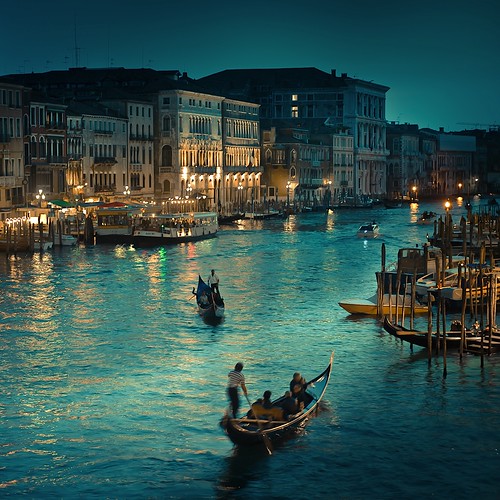
For the purposes of this assignment I decided to look up pictures of Venice, Italy because I think it is just beautiful. 


I did have some trouble adding images to my blog.  I did not want to save them and then upload them, I just wanted to link to them.  Many of the photos of Venice are copyright protected so I had trouble finding the link to the image itself and not the website that held the image.  After much huffing and puffing and hair pulling I eventually figured out how to "copy image location" to get the correct .jpg link.   

I did create a flickr account as well.  I have upload some pictures of one of my recent programs which was a Steampunk Program.

I Geek Knitting

At work we've recently gotten some posters from Geek the Library. In celebration of my geeky-ness I've decided to share with you what I geek.

One of my favorite knitting sites is called Ravelry.  It is like facebook for knitters and crocheters.  People share what their working on and post pictures.  Many people also post patterns that they have designed or yarn that they make, dye, or spin.  I have found lots of free patterns on there.    

One more link just for fun.  Check out this facebook page on yarnbombing.

Monday, September 19, 2011

RSS Feeds

I can't believe I haven't been using RSS feeds until now.  I really like them because I have quite a few book blogs that I keep up with and reading them in google reader will be so much easier than going through them one by one in my bookmark menu.  I think I will be able to use these quite a bit with both my personal internet wanderings and work related wanderings.

I really like being able to organized my feeds by putting them into folders.  I have created folders for: book blogs, programming blogs, etc. 

23 Things

Well, I'm finally ready to post something to my "23 Things" blog. 

I just finished the horde section and I thought that one would be easy since I use horde everyday.  When I got to the advanced modules though I realized that I had forgotten how to add filters to my inbox.  I was very glad to be reminded how to do that since I subscribe to a few very active listservs.  It is overwhelming to open my email and have 300+ unread emails. 

The other advanced module I completed was to add a signature to my emails.  I have already added a signature to the emails I send from Thunderbird but had never learned how to add one to emails sent from horde.  This was a very useful tip.